
It’s 2026, and your AJO/AEP implementation is humming. Your profiles are unified, and your journeys are real-time. But a unified profile is only as useful as the actions it can take.
You need to send a coupon code generated by your external Loyalty system? Or trigger a order fulfillment update via a third-party Logistics partner? You need Custom Actions.
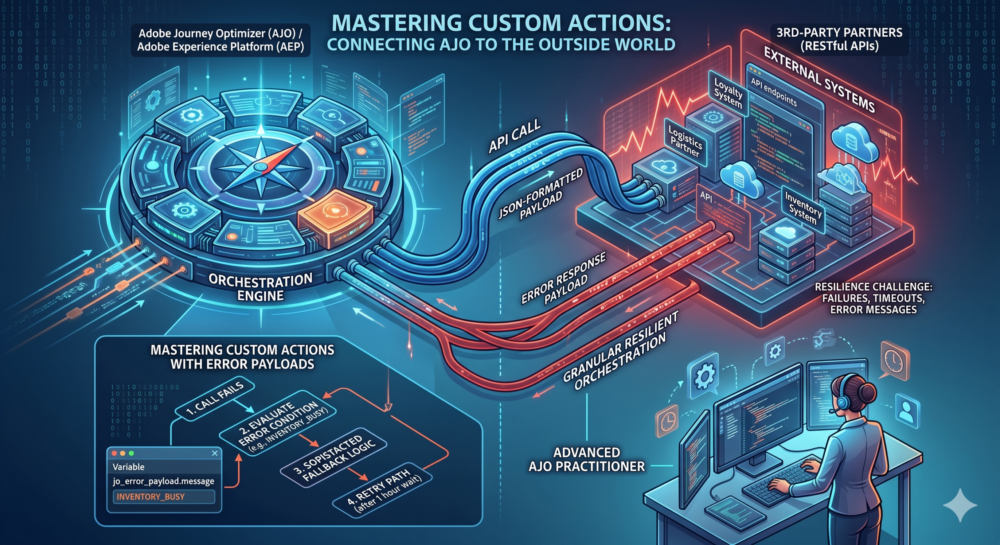
Custom Actions allow AJO, which is essentially an API-first orchestration engine, to call any RESTful API with a JSON-formatted payload. This isn’t just about sending data; it’s about pushing personalized contextual information directly into other systems on the edge.
The Resilience Challenge in 2026
The biggest mistake technical practitioners make is assuming an API call is just one step. In a distributed architecture, external systems can fail, timeout, or return unexpected data.
Until recently, AJO handles this by placing a profile in an “error” or “timeout” status. A single failure would stop the profile’s journey at that activity, requiring manual intervention or, worse, causing a negative customer experience.
Mastering the Error Response Payload
In 2026, the advanced AJO practitioner has a new tool: Custom Actions with error response payloads.
When configuring your Custom Action in the Administration menu, you can now define an optional error response payload structure. This structure will expose the API’s failure context directly in the journey, making it available as a set of variables you can use for personalization and sophisticated fallback logic.
Let’s look at a concrete example: You are calling an API to reserve inventory (e.g., in a Loyalty win-back journey). If the external system is busy, it returns an HTTP 422 with a specific JSON error message.
Previously, that profile was stuck. Now, in your AJO journey:
-
The profile enters the Custom Action to call the inventory API.
-
The call fails (HTTP 422).
-
Because you defined an error response payload, AJO automatically takes the ‘Timeout/Error’ branch (which should always be configured for critical APIs).
-
You can then use a Condition activity on that branch to evaluate the specific error. For instance, if
jo_error_payload.messagecontains “INVENTORY_BUSY,” you can route the profile through a dedicated fallback path that waits an hour and retries, rather than simply failing.
This level of granular, resilient orchestration is what separates a good AJO practitioner from a great one. It is no longer enough to just set up the connection. Mastering AJO in 2026 requires designing for resilience using these sophisticated technical fallback mechanics.